

Formula: How to Calculate Mortgage Payment? Learn Here
Buying a home is easily the biggest financial commitment I've ever made. I still remember the mix of excitement and anxiety when I signed my first contract. But here is the hard truth I learned early on: looking at the listing price alone is a rookie mistake. You need to look at the monthly payment to know what you can actually afford.
Financial clarity is your best defense against being "house poor." In this guide, I'm going to walk you through exactly how to calculate mortgage payments manually, so you understand the math, and review the best calculators I've used in 2026. My goal is to help you compare different financial scenarios so you can sign those papers with total confidence.
People Also Read
- [2026] What is a Mortgage? Everything You Need to Know Here
- Must-Read Guide: How to Apply for a Mortgage Loan Online?
- Where and How to Compare Mortgage Loan Quotes Online?
- [Ultimate Guide] Where to Find a Loan Officer Near Me?
- What is Loan Origination? Meaning, Steps, Example, Requirements
How to Calculate Mortgage Payment by Hand?
Why calculate it by hand when we have apps? Because understanding the mechanics gives you negotiation power. When you know how the numbers move, you spot errors and understand quotes better.
However, before we do the math, we need to define PITI. In the US mortgage world, your bill isn't just the loan repayment. It is usually Principal, Interest, Taxes, and Insurance. If you only calculate the first two, you are going to be shocked when the actual bill arrives. Let's look at the core formula for the Principal and Interest.
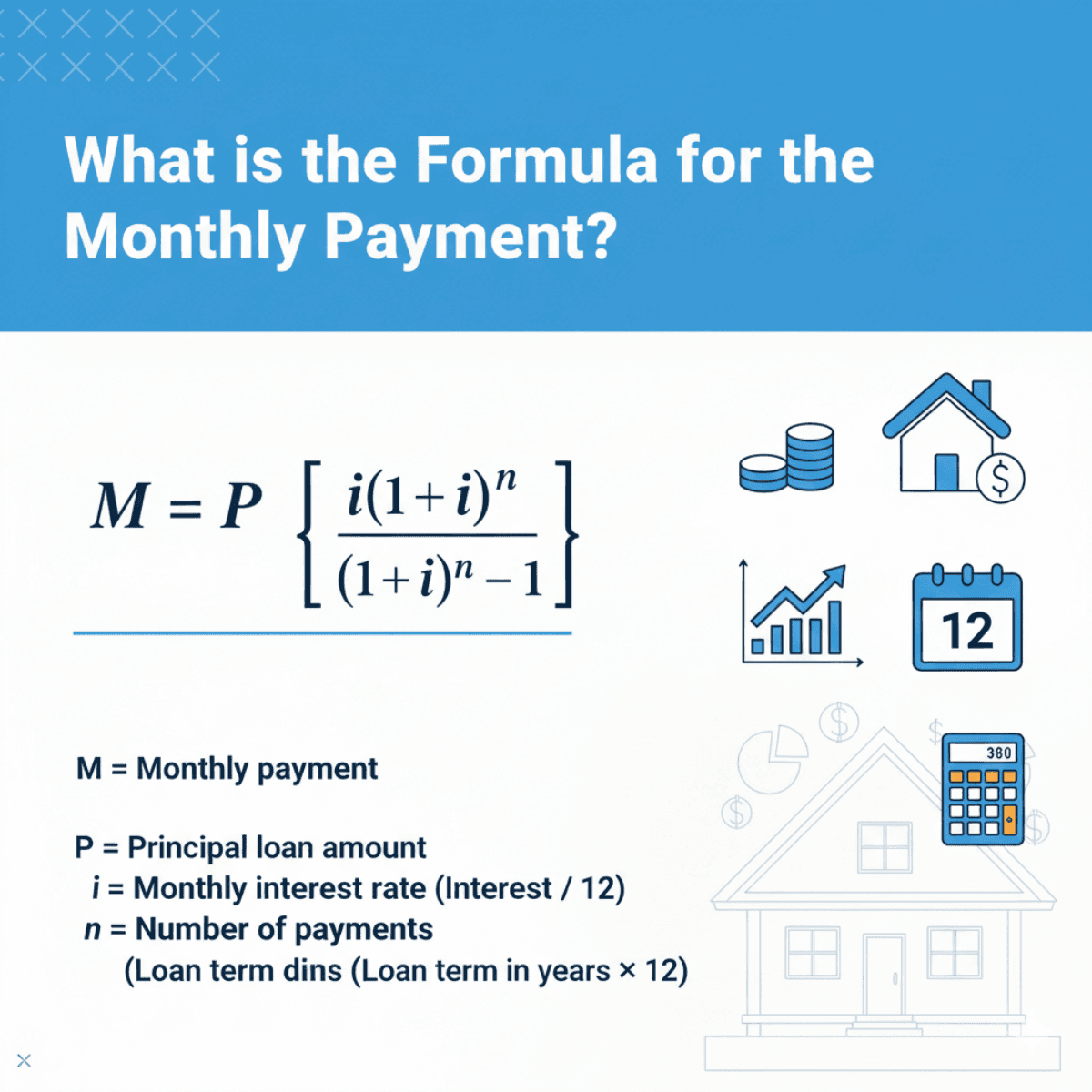
What is the Formula for the Monthly Payment?
The standard formula used by lenders to determine your monthly amortization is fixed. It looks intimidating at first glance, but it is actually just simple algebra.
Here is the formula: M = P [ r(1+r)^n ] / [ (1+r)^n - 1 ]
Let's break down what these letters actually mean for your wallet:
-
M (Total Monthly Payment): This is the final number you represent the Principal and Interest (P&I).
-
P (Principal): This is the loan amount. This is the home price minus your down payment.
-
r (Monthly Interest Rate): This is where most people get the math wrong. Lenders give you an annual rate (e.g., 6.5%). To get r, you must divide that annual percentage by 12.
-
n (Number of Payments): This is the total number of months you will be paying. For a standard 30-year fixed loan, this is 30×12=360
Even a tiny fraction of a change in "r" drastically changes "M" over the life of the loan.
Example of Calculating Mortgage Payment
Let's run a real-world scenario to see this in action.
Imagine you are eyeing a property for $400,000. You have saved up a $80,000 down payment (20% of $400,000), which means your Loan Amount (P) is $320,000. You secured a 30-year fixed mortgage at an interest rate of 6.5%.
Here is the step-by-step breakdown:
-
P (Principal): $320,000
-
r (Monthly Rate): 0.065÷12=0.005417
-
n (Total Months): 30×12=360
Plugging these into the formula:
M = 320000 × [0.005417(1+0.005417)^360] / [(1+0.005417)^360 - 1] ≈ $2,022.62
After crunching the numbers, the Monthly P&I Payment is approximately $2,022.62.
Also, don't forget PITI! If you add estimated Property Taxes (~$400/mo) and Homeowners Insurance ($100/mo), your actual check to the bank is closer to $2,522.
Best Mortgage Payment Calculators 2026
While doing the math by hand makes you smarter, doing it for five different houses is tedious. That is where automation comes in. I have tested dozens of tools, and for 2026, these three stand out for their accuracy and user interface.
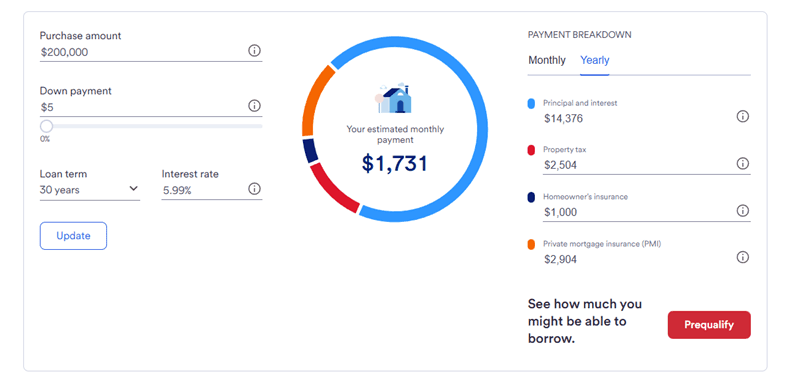
US Bank Mortgage Payment Calculator
I often recommend the USBank Calculator to friends who want a "no-nonsense" view of their finances. It is clean, professional, and backed by a major lender's data standards.
You input the standard Purchase Amount, Down Payment, Loan Term, and Interest Rate. The result section is excellent. It provides a clear Estimated Monthly Payment accompanied by a detailed Monthly and Yearly Breakdown. It doesn't just show the loan. It explicitly separates Principal, Interest, Property Tax, Homeowner's Insurance, and PMI.
The visualization of costs is its biggest strength. It forces you to see the "hidden" costs, like insurance. However, it can feel a bit rigid if you are trying to calculate non-standard loan structures.
UMCU Mortgage Payment Calculator
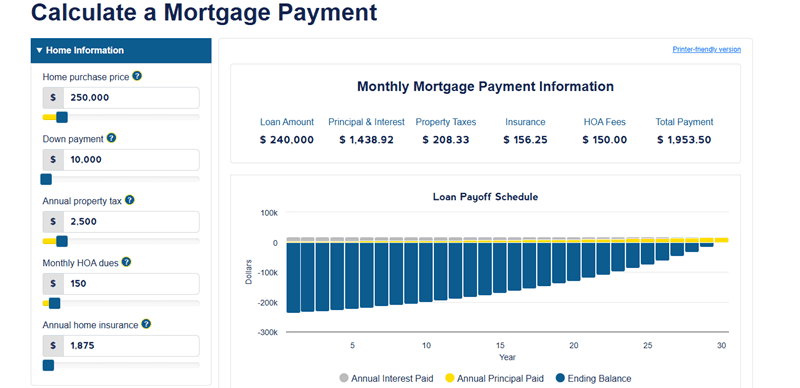
The UMCU (University of Michigan Credit Union) calculator is a hidden gem, specifically for people who are detail-oriented or buying into a community with fees.
It allows for granular inputs that others miss, specifically, Monthly HOA dues. If you are buying a condo, this is non-negotiable. You also input Price, Down Payment, Tax, and Insurance. The results are robust. You get the Total Payment, but the winner here is the Loan Payoff Schedule. It generates a line graph and table showing Annual Interest vs. Principal Paid. It visually proves how little principal you pay in the first few years (a sobering realization!).
The Amortization Schedule is fantastic for long-term planning. The downside? It focuses heavily on the "loan" aspect and lacks a yearly summary view for the total monthly cash flow compared to US Bank.
Zillow Mortgage Calculator
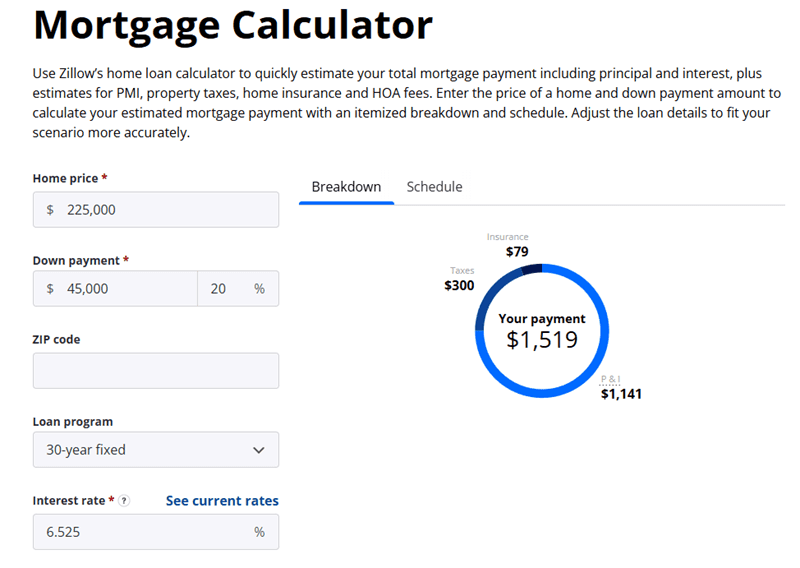
Zillow is likely the first place you looked for a house, so it makes sense to use its calculator. It is designed for the "House Hunter."
The magic here is the ZIP code input. Zillow uses its massive database to auto-fill estimated Property Taxes and Insurance rates based on the location. It also supports Loan Programs like 5/1 ARMs easily.
The Interactive Pie Chart. It centers your "Your Payment" number and surrounds it with colorful slices for Taxes, Insurance, and P&I. It also features a "Schedule" line graph showing how your Principal and Interest balance shift over time.
It offers the best User Experience (UX), and the location-based auto-fill saves time. But be careful: The auto-estimates are just estimates. Always verify the tax rate with the county, as Zillow's data can sometimes lag behind current assessments.
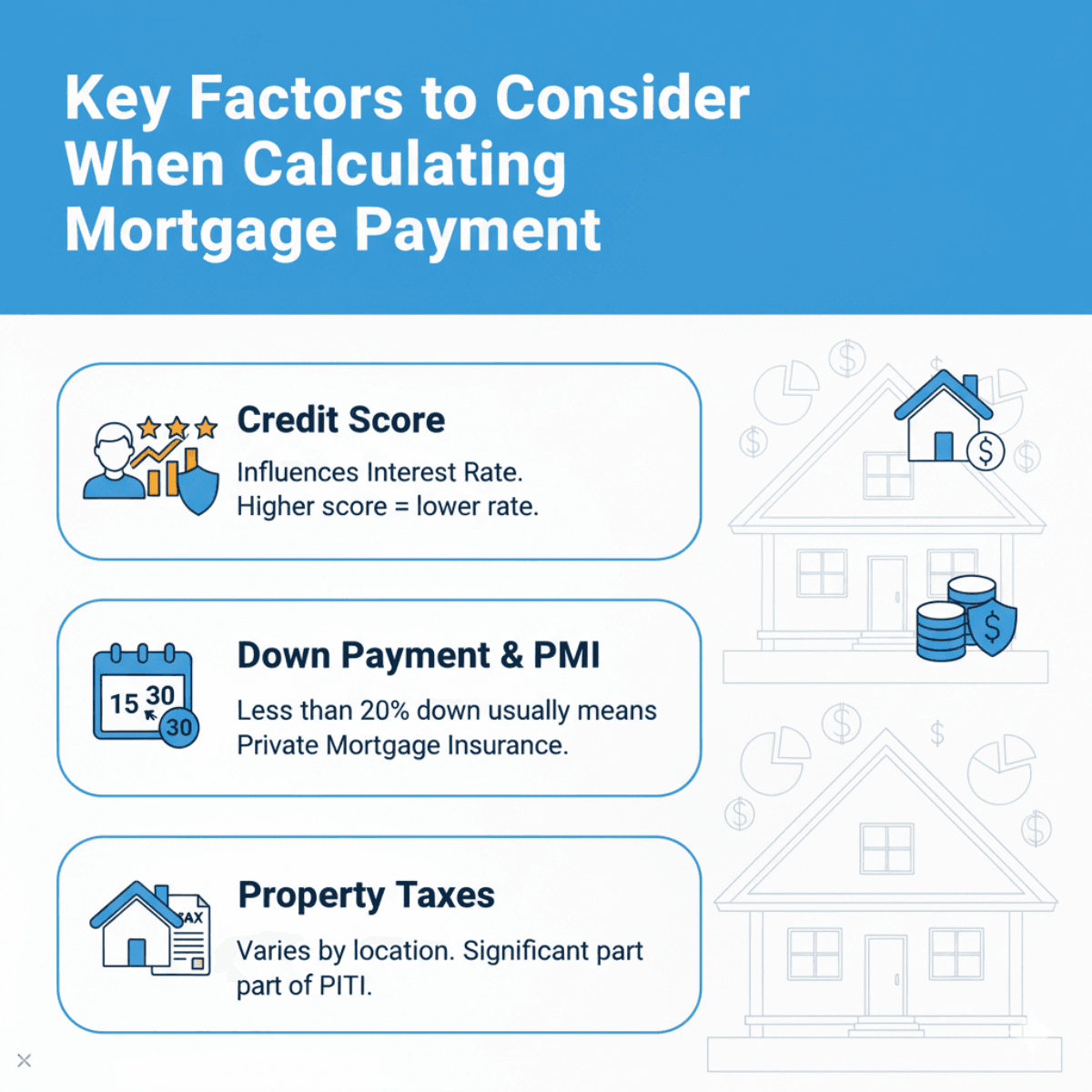
Key Factors to Consider When Calculating Mortgage Payment
Calculating the number is one thing. Understanding what changes that number is another. From my experience in the industry, here are the levers that control your financial destiny:
-
Credit Score: This is the single biggest factor influencing your Interest Rate. A score of 760 might get you 6.5%, while 680 could bump you to 7%. On a $400k loan, that difference costs you tens of thousands over the life of the loan.
-
Down Payment & PMI: If you put down less than 20%, you will likely pay Private Mortgage Insurance (PMI). This protects the lender, not you, and it adds $100-$300 to your monthly bill purely as "wasted" money.
-
Loan Term: A 30-year term makes the monthly payment lower, but you pay massive interest. A 15-year term spikes your monthly payment but saves you a fortune in the long run.
-
Property Taxes: These vary wildly by location. A house in New Jersey might have $12,000/year in taxes, while a similar home in Alabama has $1,500. This PITI component can break a budget.
FAQs About Calculating Mortgage Payment
Q1. How to calculate mortgage payment in Excel?
If you want to build your own spreadsheet, Excel makes it easy. Use the function: =PMT(rate/12, nper, pv, [fv], [type]).
-
Rate/12: Your annual interest rate divided by 12.
-
Nper: Total number of months (e.g., 360).
-
Pv: The loan amount (enter as a negative number to get a positive result).
Q2. How much is a 200,000 mortgage payment for 30 years?
Assuming a standard scenario in 2026 with an interest rate of 6.5%, the monthly mortgage payment would be approximately $1,264. If you add taxes and insurance, plan for a monthly budget closer to $1,600 - $1,700.
Q3. What is the monthly payment on a $400,000 loan at 7%?
For a $400,000 loan at 7% fixed over 30 years, the principal and interest payment is $2,661.21. Including typical taxes and insurance, this could exceed $3,300/month.
Q4. How does a higher interest rate affect my payment?
Interest rates destroy buying power. For every 1% increase in interest rate, your buying power decreases by roughly 10-11%.
Conclusion
Calculating your mortgage payment isn't just a math exercise. It's a "sanity check" for your future life. Whether you use the formula: M = P [ r(1+r)^n ] / [ (1+r)^n - 1 ] or one of the excellent calculators like US Bank or Zillow, the goal is the same: visibility.
Remember, the bank only cares if you can repay the loan. You need to care if you can afford the loan and still have a life. Always look at the full PITI (Principal, Interest, Taxes, Insurance) number, not just the teaser rate. Before you start touring homes in 2026, run these numbers, test different scenarios, and lock in a budget that keeps you financially secure.
